
Staff Engineer: Leadership beyond the management track

 StaffEng Banner

Nice blog post about staff (or engineering manager) archetypes:

Staff Engineer: Leadership beyond the management track
  • The Tech Lead guides the approach and execution of a particular team. They partner closely with a single manager, but sometimes they partner with two or three managers within a focused area. Some companies also have a Tech Lead Manager role, which is similar to the Tech Lead archetype but exists on the engineering manager ladder and includes people management responsibilities.
  • The Architect is responsible for the direction, quality, and approach within a critical area. They combine in-depth knowledge of technical constraints, user needs, and organization level leadership.
  • The Solver digs deep into arbitrarily complex problems and finds an appropriate path forward. Some focus on a given area for long periods. Others bounce from hotspot to hotspot as guided by organizational leadership.
  • The Right Hand extends an executive's attention, borrowing their scope and authority to operate particularly complex organizations. They provide additional leadership bandwidth to leaders of large-scale organizations.
This blog also has a nice cal overview to visualize the different working approaches for each archetype:
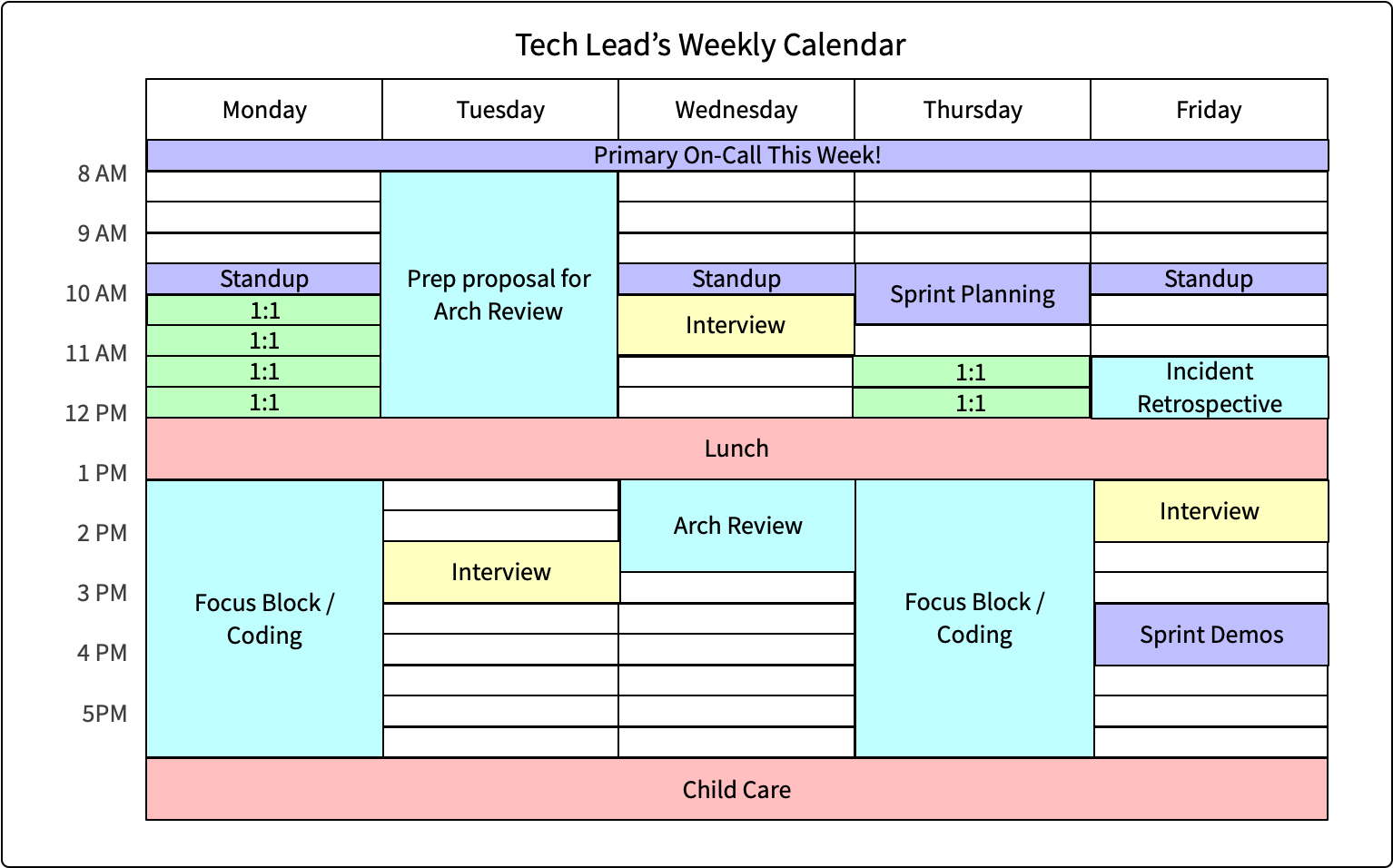
Example calendar for a Tech Lead archetype


If you want to read about this, checkout the book Staff Engineer: Leadership beyond the management track!

Comments

Most Favorite Posts

TechLead: React Native vs Flutter vs WebView - Hybrid Mobile App Development for 2018

Topics covered: Xamarin, Cordova, Flutter, Titanium, React Native, Flutter React Native Web Views Native Development: iOS and Android Types of apps: Fully native high interactivity expensive: iOS and Android high interactivity, personalization, performance worth for top 50 apps less and less apps are installed you need to shine to be discovered user picks only best app among similar featured apps Hybrid Technologies Xamarin, Cordova, Flutter, Titanium, React Native, Flutter Be aware of the maturity lock-in effect infrastructure and tooling required might get worst of both world should be incrementable updatable check where it makes sense WebViews only Native App shells: Amazon App, Apple App Store, WeChat Mainly for smaller companies Trending on Google Links: AirBnB is sunsetting its React Native development What’s Next for Mobile at Airbnb Server-Driven Rendering Even though we’re not using React Native, we still see the val...

Firebase realtime database stability - and monitoring

Firebase SLA Firebase will use commercially reasonable efforts to make Firebase available with a Monthly Uptime Percentage (defined below) of at least 99.95%, in each case during any monthly billing cycle (the "Service Commitment"). Firebase SLA Service Level Agreement for Hosting and Realtime Database Firebase Status Page Why Firebase sucks In the 3 years since starting to use Firebase we’ve suffered from so many outages I’ve literally lost count. @ Medium.com Status History Overview Statusgator Does anyone has real-life experience with the stability of Firebase or Firestore? Please leave a comment! We heared that Firestore is much more stable than Firebase which usage for new project is discouraged...

Backend-driven native UIs

Backend-drive native UIs John Sundell  Slide Share Using Back-End Design to Create Customizable Front-End Mobile Experiences By controlling the front end of mobile apps from the back end we can build customized experiences at runtime, creating cleaner interfaces and reducing load times. Nithin Rao UX Magazine The Hub Framework Welcome to the Hub Framework - a toolkit for building native, component-driven UIs on iOS ( no Android support released yet ). It is designed to enable teams of any size to quickly build, tweak and ship new UI features, in either new or existing apps. It also makes it easy to build backend-driven UIs. The Hub Framework has two core concepts - Components & Content Operations. Spotify LeeGo: Build UI without UIView LeeGo is a lightweight Swift framework that helps you decouple & modularise your UI component into small pieces of LEGO style's bricks, to make UI development declarative, configurable and highly reusable. Wang Shen...

Validity Time Auto-Renewables in Sandbox

The subscription durations, sandbox durations and incentive durations of auto-renewables. Hint: In Sandbox the validity time differs from live environment!!! Durations Sandbox Duration Incentive Durations (optional) 7 days 3 minutes 7 days 1 month 5 minutes 7 days, 1 month 2 months 10 minutes 7 days, 1 month 3 months 15 minutes 1 month 6 months 30 minutes 1 month, 2 months 1 year 1 hour 1 month, 2 months, 3 months After 6 extensions the abo is cancelled automatically in the sandbox environment.

JSLint

Many JavaScript implementations do not warn against questionable coding practices. Yes, that's nice for the site that "works best with Internet Explorer" (designed with templates, scripted with snippets copied from forums). But it's a nightmare when you actually want to write quality, maintainable code. That's where JavaScript Lint comes in. With JavaScript Lint, you can check all your JavaScript source code for common mistakes without actually running the script or opening the web page. JavaScript Lint holds an advantage over competing lints because it is based on the JavaScript engine for the Firefox browser. This provides a robust framework that can not only check JavaScript syntax but also examine the coding techniques used in the script and warn against questionable practices. JavaScript Lint Online Form

Dark Theme (Dark Mode) in Android WebViews, WKWebViews and CSS

So your apps just implemented a shiny new dark theme and it’s looking 👌 There are lots of benefits to having a dark theme in your application, and having it consistent throughout your application allows for a great user experience. But what happens when the the user runs into a WebView in your app? Support: if (WebViewFeature.isFeatureSupported(WebViewFeature.FORCE_DARK)) { ... } Set: WebSettingsCompat.setForceDark(webView.settings, WebSettingsCompat.FORCE_DARK_ON) Current setting: val forceDarkMode = WebSettingsCompat.getForceDark(webView.settings) Joe Birch Assuming your question is asking how to change the colors of the HTML content you are displaying in a WKWebView based on whether light or dark mode is in effect, there is nothing you do in your app's code. All changes need to be in the CSS being used by your HTML content. CSS dark mode via :root variables, explicit colors and @media query: :root {     color-scheme: light dark;      ...

Automating Over The Air Deployment for iOS

Over the air deployment is based on a new command in the build menu of Xcode called “build and archive” which packages the application with an embedded provisioning profile. There have been many questions on how to integrate this feature in a continuous integration process. The “xcodebuild” command is well known : it builds an Xcode project from the command line and generates an “.app” file. You can use this command to build your application from a script ran by a software factory. But the generated file cannot be distributed over the air since it misses the embedded provisioning profile. We need to build the project into an “.ipa” file, containing the provisioning profile and signed with your developper identity. To be able to find the command line, the trick was to watch the system console log while running a “build and archive” through Xcode. #!/bin/sh # build.sh # # Created by Vincent Daubry on 19/01/10. # Copyright 2010 OCTO. All rights reserved. PROJDIR=${WORKSPACE...