Forget about MVC, MVVM and MVP - MVI (Model-View-Intent) is coming!

WhatDevsNeedToKnowAboutMVI-1

module.exports = function (model, view, intent) {
if (view) { view.observe(model); }
if (intent) { intent.observe(view); }
if (model) { model.observe(intent); }
};

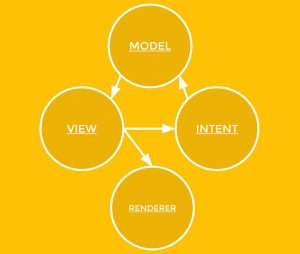
The first thing to notice is regarding the communication, as you can see from the schema above the communication is unidirectional.

In MVI, the view is exposing an observable for the intent to capture all the user interactions from the view and passing the data through an observable to the intent. The intent is preparing the data received for the model, and these data are passed to the model via an observable again. Last but not least the model save these data and update the view exposing an observable to the view.
The view is not changing directly, but it’s just preparing the virtual tree to be rendered by any renderer.

Bear in mind that one peculiarity of an MVI architecture is that an object shouldn’t manipulate or directly call any method of another object; the only communication allowed are through observables!

The unidirectional data flow nature allows easily to structure and debug any application without following the complexity of a traditional event-driven architectures.

What Developers need to know about MVI
The New Stack - Luca Mezzalira

MVI on Android
Medium.com

Android Clean Architecture MVI Boilerplate
GitHub

Comments

Most Favorite Posts

Server-driven UI (SDUI): Meet Zalandos AppCraft and AirBnB Lona

A short WTF: Joe Birch:  SERVER DRIVEN UI, PART 1: THE CONCEPT Zalando seems to follow the SDUI principle as well - defining a common design language and construct the screens on the backend while displaying them natively on the clients. They even go one step further; they implemented a mighty toolset to enable non-technical stakeholders to define their own native app screens Compass: Web tooling to create screens and bind data Beetroot: Backend service that combines the screen layout definition with the data Lapis/Golem: iOS/Android UI render engines Crazy cool! Good job, guys (when you do an open-source release?) To even move faster a Flutter based UI render engine implementation was great! See also AirBnB Lona SDUI approach Building a Visual Language Why Dropbox sunsetted its universal C++ mobile project and AirBnB its React Native implementation

Judo App - Server Driven UI out of the box

Judo App Judo brings server-driven UI to your iOS and Android apps. Build user interfaces visually in a fraction of time and publish them instantly without submitting to the app store. Build Experiences - With No Code The Judo app for macOS, available through the App Store, is built for design professionals with common keyboard shortcuts and familiar concepts like canvas, layers and inspector panel. Workflow is streamlined with the ability to drag and drop media files directly into your experiences and manage your own Judo files in Finder. Manage Creative Execution A Judo experience is interactive and can include text, images, video and buttons. An experience may be part of a screen, a single screen, or more typically multiple linked screens. Judo supports screen transitions, carousels, horizontal scrolling and modals. Clients can add custom fonts and define global colors and these are updates applied universally. Effortlessly Deploy Judo Cloud syncs your experiences with your iOS and ...

Dark Theme (Dark Mode) in Android WebViews, WKWebViews and CSS

So your apps just implemented a shiny new dark theme and it’s looking 👌 There are lots of benefits to having a dark theme in your application, and having it consistent throughout your application allows for a great user experience. But what happens when the the user runs into a WebView in your app? Support: if (WebViewFeature.isFeatureSupported(WebViewFeature.FORCE_DARK)) { ... } Set: WebSettingsCompat.setForceDark(webView.settings, WebSettingsCompat.FORCE_DARK_ON) Current setting: val forceDarkMode = WebSettingsCompat.getForceDark(webView.settings) Joe Birch Assuming your question is asking how to change the colors of the HTML content you are displaying in a WKWebView based on whether light or dark mode is in effect, there is nothing you do in your app's code. All changes need to be in the CSS being used by your HTML content. CSS dark mode via :root variables, explicit colors and @media query: :root {     color-scheme: light dark;      ...

Bending Test: iPhone 6, HTC One, Moto X and more